

Issue · 06
Four apps, one calendar
September 17, 2026
This week from Catey
Last week I was setting up a calendar feed for one of the soccer leagues when I noticed a warning buried in the setup page: changes could take up to 12 hours to appear in Google Calendar.
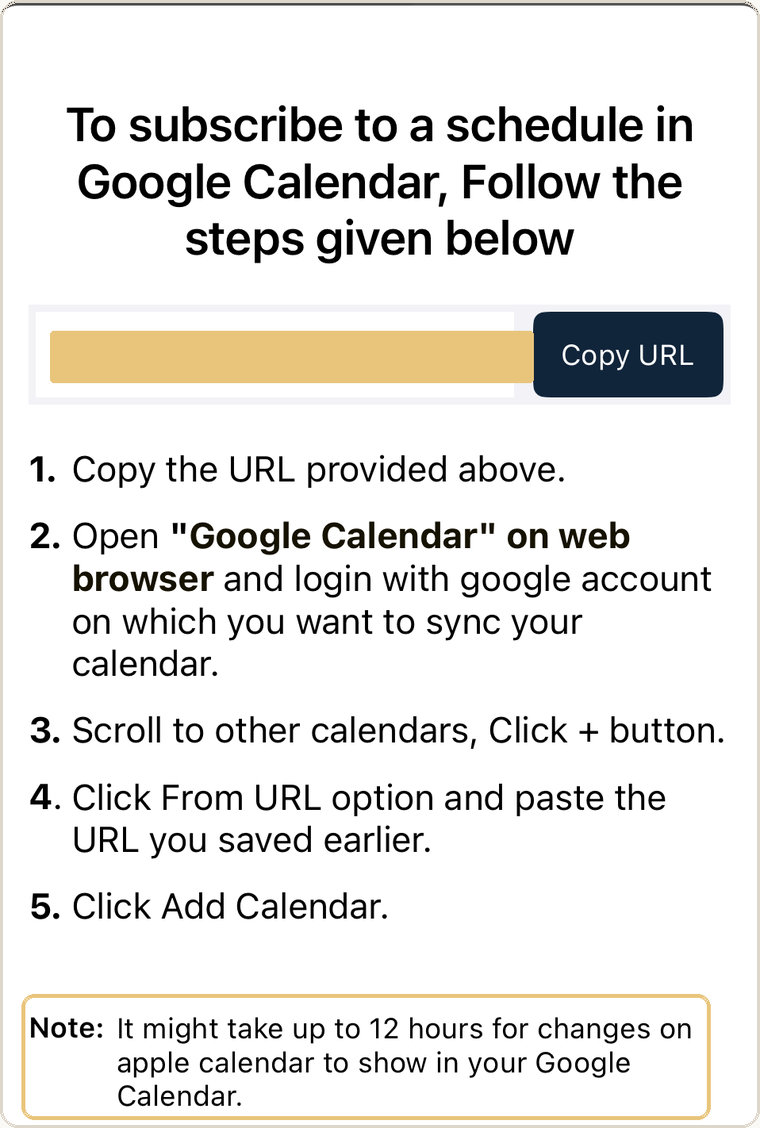 The warning sits at the bottom of the setup screen: changes can take up to 12 hours to reach Google Calendar.
Technically, that's a calendar integration. Practically, it's not one I'm willing to trust.
We've officially entered the sports-app phase of parenting. One kid has soccer on one platform. Another has soccer somewhere else. Both girls do ballet, which has its own system. School enrichment lives in CampBrain. Four platforms, each with a slightly different answer to the question I care about most: how does this get onto the calendar I actually use?
And I'm only at the beginning of this. More teams, more classes, more apps, more places a schedule can change without making its way to the person who needs to know. I've heard enough from other parents about last-minute field changes and rain cancellations to know that a calendar running a day behind creates its own kind of mental load. You still check the app. You still wonder whether the calendar is right. You still have to remember which source of truth is the actual source of truth.
So my first question wasn't "how do I manage this better?" It was "can I fix the connection?"
That turned out to be the more useful question.
The fix was boring
Technologically speaking, extremely boring. The soccer platform offered a live calendar feed. Instead of asking Google Calendar to subscribe to it and refresh whenever Google felt like it, AI and I set up a small script that checks the feed every five minutes and keeps a pair of dedicated soccer calendars current. Practices on one, weekend games on the other, colored to match the calendars they sit next to so they fit right into the system we already use.
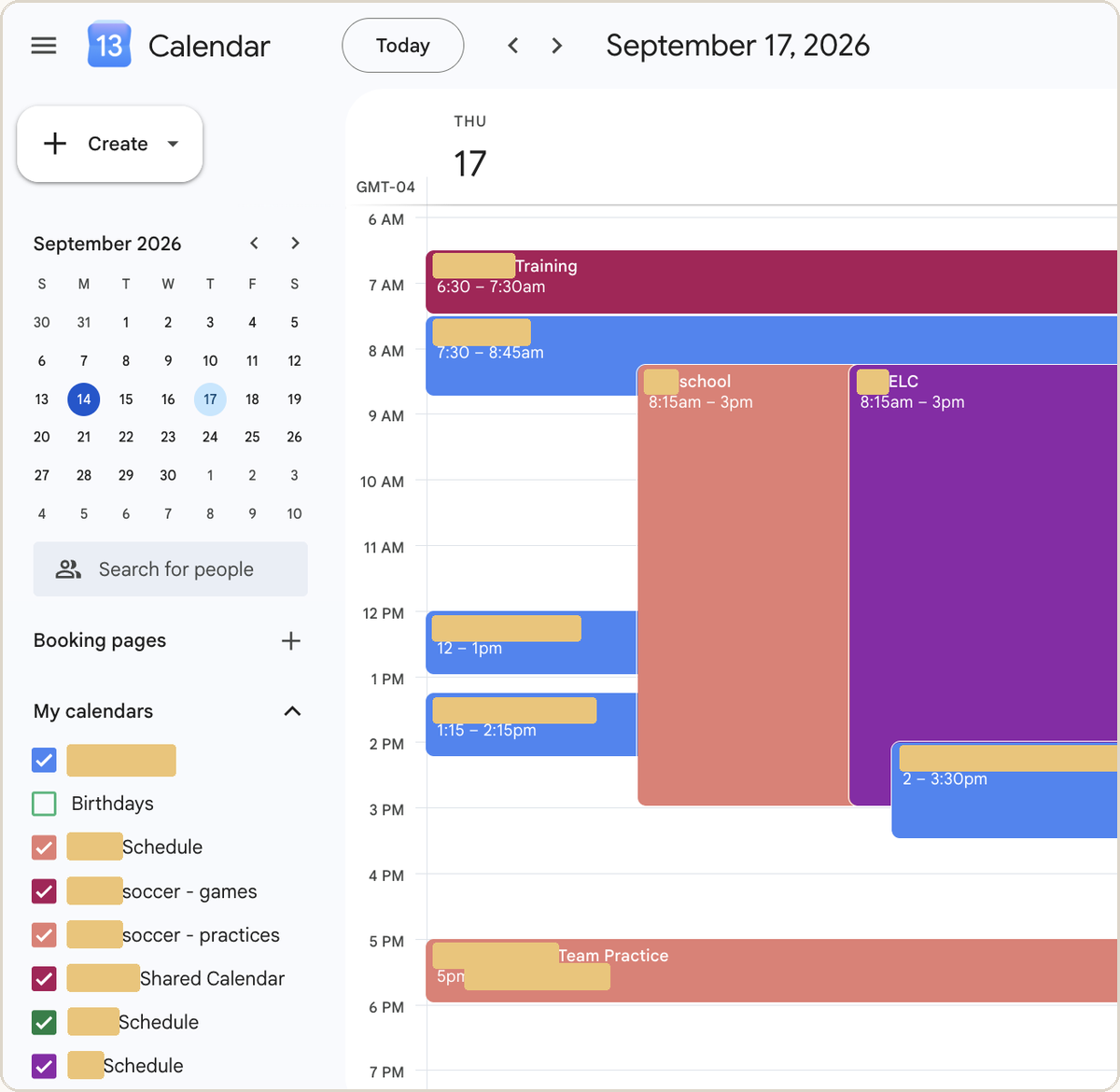 Two separate machine-managed calendars in the sidebar, colored to match the ones they sit next to. The 5pm practice reads as part of the same day, not a bolt-on.
Once we'd figured out how it should work, the setup took about 15 minutes.
I couldn't have built it myself. Not because the code is sophisticated (it isn't), but because I wouldn't have known where to start. I didn't know how a calendar feed works, how often Google will check it, how to recognize the same event after its time changes, or how to keep an automation from touching the calendars I actually care about.
AI walked me through every one of those decisions. It didn't become my calendar. It helped me build a piece of infrastructure I never would have built on my own.
An old rule almost got in the way
Months ago I'd told Claude not to use scripts for calendar work. Its normal connection had failed, it improvised, and the events landed in the wrong year on the wrong days. We cleaned it up, and I gave it a very reasonable standing instruction: don't reach for that approach with my calendar.
So when I brought it this problem, Claude briefly raised the script idea, then mostly talked itself out of it. Partly because of the way I'd organized my calendars, partly because of the old rule I'd given it.
I still felt like there had to be another way, so I took the problem to ChatGPT. The shift was simple: don't let the script touch my real calendars. Give it dedicated calendars of its own and make them fit into the system I already use.
The old rule wasn't wrong. It just belonged to a different situation. Same technology, completely different job.
AI gets better at working with us as it learns our preferences. Those preferences can also quietly become constraints. Sometimes you have to say: that was true for that problem. Reconsider it for this one.
Then it broke
Or at least I thought it had. I set everything up on Thursday. Saturday morning I woke up to a string of error emails from Google.
My reaction wasn't "did it destroy my calendar?" We'd been careful enough that I knew the real calendars were protected. My reaction was: did I just create one more system I have to babysit?
The whole point was to take something off my plate. If I had to scan a daily error log to confirm my clever automation was still alive, I'd just moved the work somewhere else.
So I went back to the AI. The soccer platform's server had been returning an occasional temporary error. We changed the script so it retries on its own, fails without touching the calendar, and only emails me if the problem lasts long enough that I'd actually need to do something.
Which is the part I keep thinking about. "Does it work?" isn't a high enough bar. The better question is whether it keeps working quietly enough that I can stop thinking about it.
What I'd reuse
I'm not suggesting you go learn to write scripts. That misses the point. But I'd run the same thought process the next time a league or camp or activity platform hands me a half-working calendar integration:
- Start with the system you already trust. Decide where information belongs and who needs to see it before you automate anything.
- Look for a live calendar feed (often called iCal or ICS). Even when a platform's Google integration is clunky, there may be a usable feed underneath it.
- Keep machine-managed calendars separate from your real ones. Ours writes only to disposable soccer calendars. If it ever goes haywire, I delete them without risking years of family history.
- Design for failure. Ours skips anything it can't confidently classify, never deletes events, retries temporary errors, and only asks for my attention when there's something to do.
- Ask AI to fix the system, not just do the task. "Put these games on my calendar" is useful. "Why do I keep having to manage this, and can we get rid of that?" is usually better.
That last one is where I've landed. There's a whole category of family admin where AI helps you do the work faster. There's another category, more interesting to me lately, where it gives you a capability you didn't have before. I'm not a developer. I'm also, apparently, someone with a little script checking a youth soccer calendar every five minutes.
Today's prompt
Pick one thing you've had to do manually at least twice this month.
For example:
- Adding the same kind of event to your calendar.
- Retyping information out of an email.
- Opening an app to check whether anything changed.
Then try today's prompt, below.
Tested in Real Households ✓
We recently moved. I'd unpacked the new kitchen but couldn't decide how to divide food across a pull-out pantry, upper cabinets, drawers and a set of shelves farther away from the kitchen.
Instead of measuring and describing every cabinet, I uploaded photos and explained the few constraints I already knew: the distant shelves should probably be backstock and baking; I wanted cans somewhere easy to see; and I still needed somewhere sensible for potatoes.
AI helped me turn the spaces into zones: everyday cans and grains in the pull-out, kid snacks in accessible drawers, overflow and baking farther away, and less-used items up high.
Verdict: worked. The useful part wasn't the organizing advice. It was being able to show AI the whole physical problem at once and work through the tradeoffs together.
Try this week
Before you spend five minutes describing something physical, take a picture. Show AI the pantry, closet, playroom shelf or pile you're trying to organize. Then add the context it can't see: what you reach for most, who needs access, and what is currently driving you crazy.