

Issue · 07
Claude filled the carts. I kept the jeans.
September 24, 2026
This week from Katie
Claude put three things in my daughter's Baby Gap cart. I asked it to remove two.
The floral corduroy overalls were too busy. The brown striped sweater set was far too brown. The blue floral cardigan stayed.
I'd asked Claude to shop for my daughter's fall and winter clothes in my Chrome browser, using the Claude in Chrome extension. It had to account for what she already owned, two stores that size babies differently, and a requirement for cotton because of her eczema. I wanted matching sets, classic prints or solids, and no sparkles. I asked for a suggested breakdown first, then three or four choices at a time as it built the carts.
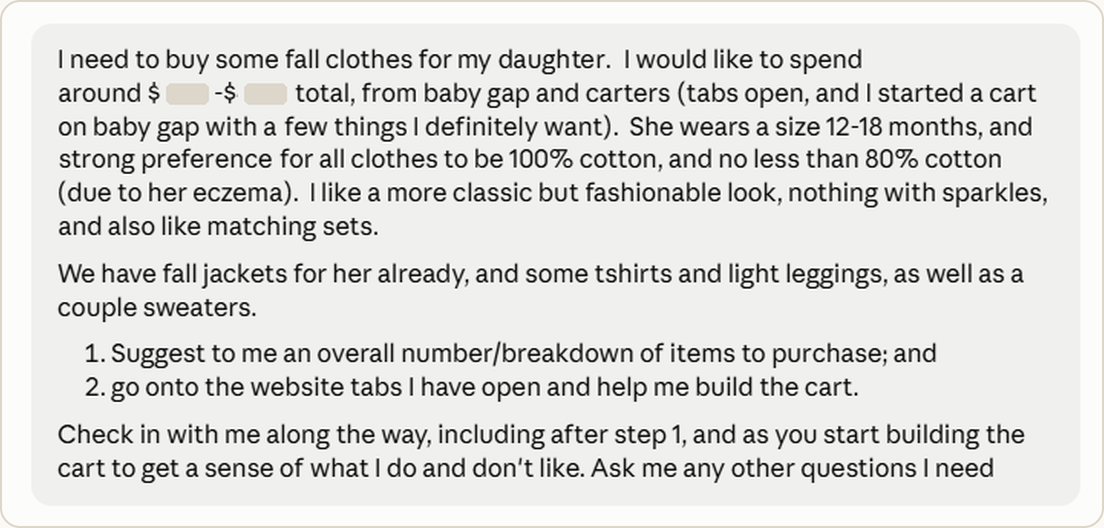 My opening prompt to Claude
Claude read the product pages, checked fabric content, and added or removed items. My reactions to its suggestions told it more than “classic but fashionable.”
The browser work had its own problems. Claude lost its connection to Chrome in the middle of a batch. It stopped, told me which items it wasn't sure had gone through, and checked the cart again once it reconnected. Chrome kept freezing on Carter's, and some items couldn’t be added to the cart. Claude found the reason: the size selector had defaulted to Preemie.
Then I changed the assignment midway. Our nanny looked at the list and asked for short sleeve tees and more bodysuits. I edited both carts myself, and placed the order with Carter’s.
Before checking out the Gap cart, I asked Claude to review. It recommended cutting items that fell below my cotton rule, duplicated other pieces, or didn't fit the rest of the wardrobe. That included my favorite item, the embroidered horseshoe jeans.
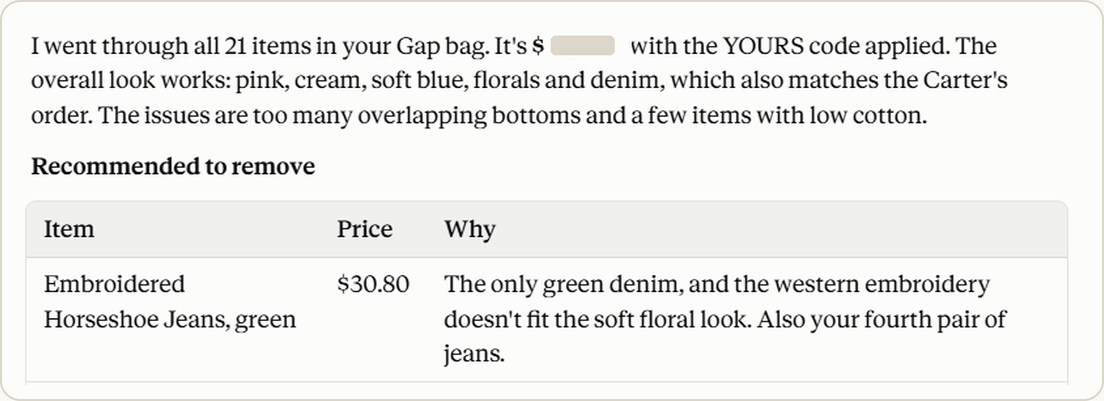 Claude’s recommendation to remove the horseshoe jeans
Other shoppers also disagreed with Claude: the green pair sold out while Claude and I were still working. The gray was in stock, and I checked out before those sold out too.
Shopping with Claude for a baby capsule closet took about an hour and a half. On my own, I would have spent the day sorting through two sites, comparing fabric labels, deciding how much to buy and still would have missed things. Claude did the hard work; I got to do the fun part: picking out cute baby clothes.
How to set it up
I installed Claude in Chrome months before this. The setup took work. I struggled to find the extension and connect it to Claude Cowork, and I had to ask Claude to walk me through it. I still don't fully understand why it works in some of my Chrome windows and not others.
As of this month, you need a paid Claude plan and Google Chrome on a computer. Other Chromium browsers and phones aren't supported. Install Anthropic's official extension, sign in, and pin its icon. Open the side panel and give it access to the site you want help with. To use it from Claude Cowork or the desktop app, go to Settings → Connectors → Claude in Chrome → Configure and turn it on. It then appears in the connectors menu in your chats. Anthropic's troubleshooting guide covers pages Claude can't see.
Cowork is also rolling out a browser built into the app, with nothing to install. It doesn't see your Chrome tabs. I used Chrome because I actually didn’t know the information in the prior sentences until I had Claude edit this newsletter for me.
Before you give it your browser
The extension can see live pages and act on sites you allow. A page can also hide instructions meant to redirect an AI tool. Anthropic has safeguards but says the risk isn't zero. Whatever is visible in a tab Claude works in becomes part of the conversation.
The side panel now defaults to automatic approval. Claude checks its own actions and asks only when it decides something needs you. You can switch to manual approval. I used manual approvals, wasn't logged in to either retailer, and kept checkout to myself. I'd start with familiar sites and keep sensitive accounts out of the Chrome profile where I use the extension.
Tested in Real Households ✓
I had Claude read both order confirmations in my email and build a wardrobe inventory for my daughter in my Family OS, a project in my Claude account that's connected to my family calendar, AI ring-fenced gmail account, and the Notion board with my To Do List. The Family OS instructions hold our household rules, preferences, and the records I want to use again. The inventory starts with what I bought. I'll add what fits, what she wears, what bothers her skin, and whether I bought too much; and will now be part of my Family OS records.
The carts saved me time last week. The record is what will help next time: Claude can check what my daughter already owns before suggesting more, or use the inventory to create a packing list. Most importantly though, it will know how I feel about embroidered horseshoe jeans.
That's the idea behind a Family OS: each task leaves context for the next one. Mine started with the calendar, because that's where our week lives. Claude checks our plans and adds events after I approve them. Once that was working, everything else had somewhere to land: appointments and deadlines, the details I don't want to explain again, and now my daughter's wardrobe. Claude prepares options it knows will fit our family; we decide what to do.