

Issue · 08
Why my calendar included “shower”
October 1, 2026
This week from Katie
When I started planning to get pregnant, I knew I would have to go off my ADHD medication and wasn’t quite sure how I would function on a day-to-day basis.
Executive-function coaching for adults was not really a thing then, so I hired a 24-year-old who usually worked with high school students.
I was a corporate lawyer in my late 30s, not studying for finals. But I needed a way to manage my life, from my job to basic functions like remembering to eat.
We built an organization system with two parts: a calendar and a to-do list.
The calendar was iCal. Anything tied to a date or time went there. I gave each part of my life its own color so I could see where the time in a day was going. Work, appointments, errands and meals all took up visible space. So did “shower” and “eat lunch.”
Those weren’t reminders that showers and lunch existed. They were reminders that both took time. If the basics of being a functioning adult didn’t appear on my calendar, they probably wouldn’t get done.
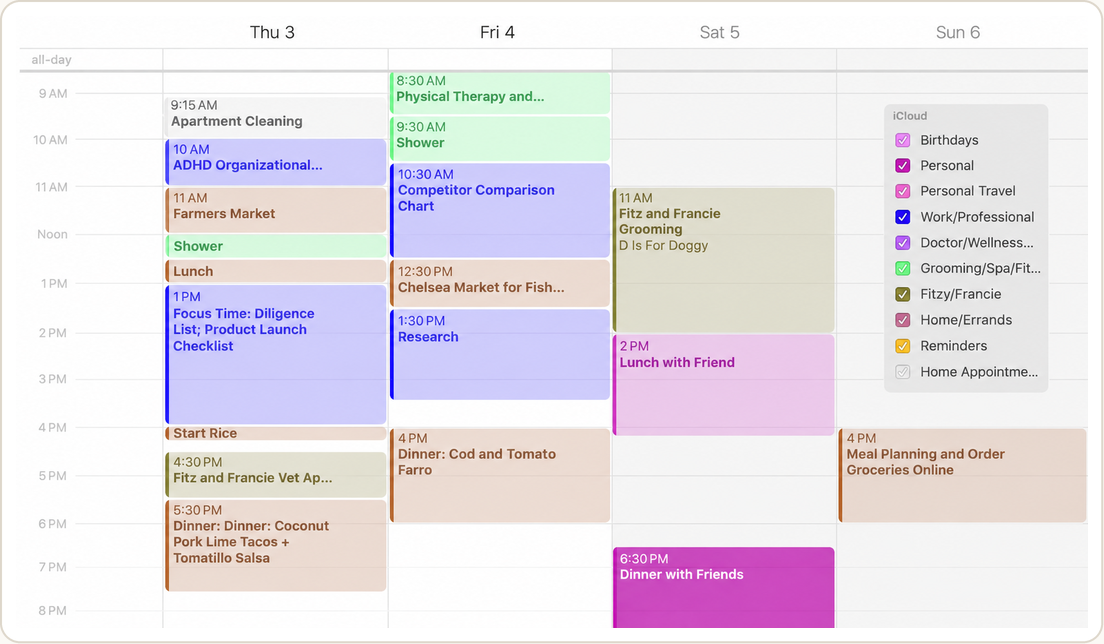 Work, appointments, errands, meals, friends, pets. If it took time, it went on the calendar.
The to-do list was one Google Doc. Every task, note, reminder and stray thought went there before I could forget it. It was a running brain dump with no elaborate categories. Its most important feature was that I used it consistently.
The specific tools were beside the point. A paper calendar and a notebook would have worked too.
The system was the rule:
- Anything with a date or time went on the calendar.
- Everything else I needed to remember, plan or finish went on the list.
I always knew where to put something, and where to look for it again.
Recently, a mom in a group chat asked how AI might help her middle schooler with ADHD as his school shifted from laptops back to worksheets, binders and folders.
My own executive dysfunction usually appears as disorganization, wildly optimistic estimates of how long something will take and difficulty getting started when a task feels too large or unclear.
So my advice wasn’t to begin with AI. It was to define the problem AI would be helping with.
Define the problem before you ask AI for answers
01 Give everything one home
Pick one place for time and one for tasks.
For a student whose school is switching away from laptops, that might be a paper planner and one notebook. For a household, it might be a shared digital calendar and one running task list.
There is no universally correct approach. The best system is the one you’ll keep using.
02 Turn projects into tasks, then tasks into time
“Apply to nursery school” is not a task. It is research, decisions, events, forms and deadlines hiding behind one line on a to-do list.
List the individual steps and estimate how long each one will take. You’ll see what can be finished quickly, what needs several days and what the first step actually is.
Then put the work into real time.
The calendar makes the to-do list honest. If something takes an hour, it needs an hour somewhere in the week. If the week doesn’t contain that hour, it isn’t getting done.
Meals, travel, transitions and basic hygiene can go on the calendar too. They take time whether or not you account for them.
03 Use AI for a specific part of the problem
Then AI can help with the pieces: breaking something big into steps, challenging a time estimate, drafting a schedule for the week.
Whatever it produces still goes on the calendar or the to-do list. An AI-generated schedule that never leaves the chat hasn’t organized anything. It has simply created a third place to check.
Tested in Real Households ✓
Ask AI to map the process before you start
I recently learned that applications for some nursery-school 2s programs were due sooner than I realized. I had a list of nearby schools and plenty of advice. What I didn’t have was the order of operations.
Did we attend open houses before applying or afterward? What was actually due, and when?
I had barely started and already felt behind. So before asking Claude for answers, I asked it to help me map the whole process.
A reusable version of my prompt
I’m overwhelmed by a complicated project: [describe it]. I’m attaching [notes and documents].
Before creating anything, help me design the simplest way to manage this in [the tool I already use]. Identify the decisions, deadlines, tasks, research and unknowns.
Ask me questions about the structure one at a time. Once we agree, populate it from my materials.
Research missing facts from primary sources and link each answer. Put anything you can’t verify on a separate list of open questions.
Start with the smallest decision I need to make before the rest of the project can move forward.
AI separated the work into decisions, research, deadlines and actions. Information it could verify went on a tracker with a source. Anything it couldn’t answer became a specific question instead of a vague source of anxiety.
Tours, open houses and deadlines went on the calendar. The rest of the work went on one to-do list.
Once you've worked through one project with AI, you know how to start the next one. The subject changes. The skills remain.